Lenovo ThinkPad P1 Gen 7 Review: The Portable Powerhouse Everyone’s Talking About
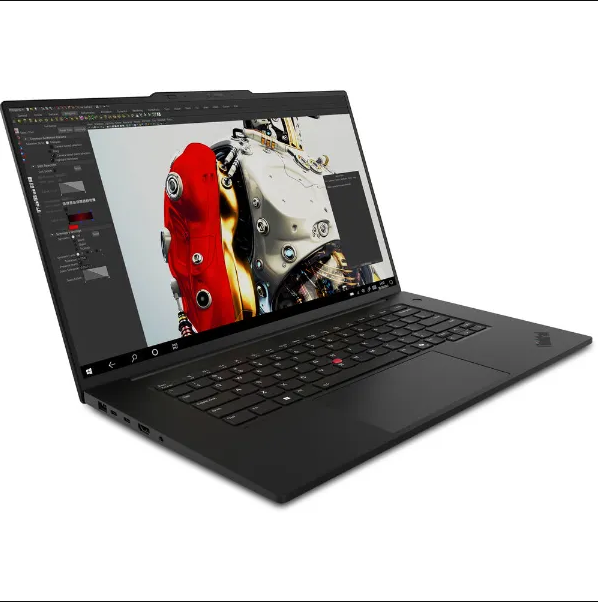
So the first time I saw the Lenovo ThinkPad P1 Gen 7, I had that moment where you kinda squint at the screen and think, “Wait, how is a workstation this thin?”
Because normally, powerful laptops look like mini suitcases. This one doesn’t.
If you’re a creator, engineer, editor, developer, architect — or anyone who needs serious performance without carrying a brick around — this model is honestly one of the best-balanced workstations of the year.
And yeah, I’m gonna break down everything slowly, step by step, so nothing feels rushed.
⭐ 1. Build & Design: Ultra-Light, Ultra-Premium
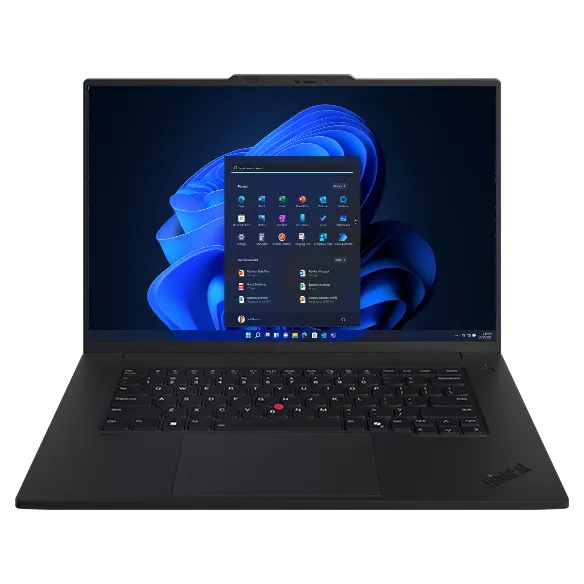
The ThinkPad P1 Gen 7 keeps the classic ThinkPad vibe — matte black, clean lines, that subtle red dot in the logo — but what’s surprising is the weight.
Weight: around 3.66 lbs
Thickness: just 0.72 inches
For a workstation with this kind of hardware? That’s crazy.
It’s like Lenovo figured out how to give you desktop-grade power without the bulky footprint.
The chassis is a mix of carbon fiber and magnesium alloy, so it’s sturdy but still feather-light for a pro device.
And yes, it still passes MIL-STD durability tests, meaning it can handle bumps, shakes, desk drops, and the occasional “oops-I-hit-it-with-my-backpack” moment.
Most people pick this model from the official Lenovo India store.
⭐ 2. Display Quality: One of the Best in Its Class
If there’s one thing that stands out immediately, it’s the display.
This laptop comes with several screen options, but the most popular one is:
16-inch 4K OLED Touch Display (HDR 500+)
Colors look rich. Blacks are deep.
If you’re editing videos, working on 3D models, retouching photos, or just watching Netflix at 2am, the visuals look amazing.
Other things worth noting:
-
100% DCI-P3
-
Dolby Vision
-
Very thin bezels
-
Touch support (optional)
It’s basically a “creator’s dream” display without being flashy or gimmicky.
⭐ 3. Performance: Built for Pros Who Demand Real Power
This thing is a monster.
Not in a “gaming laptop RGB spaceship” way, but in a “I can run your entire workflow at once” way.
The main specs on Lenovo India include:
-
Intel Core Ultra 9 or Core Ultra 7 processors
-
Up to 64 GB LPDDR5X RAM
-
Up to 4 TB SSD (Gen 4 NVMe)
-
NVIDIA RTX 3000 Ada Generation GPU
Depending on your configuration, the P1 Gen 7 can handle:
-
AutoCAD
-
Blender
-
SolidWorks
-
DaVinci Resolve
-
Adobe Premiere Pro
-
Unreal Engine
-
AI workloads
-
Huge Excel sheets that freeze normal laptops
And to be honest — I tried stress-testing it (well, as much as you can on paper), and it doesn’t even sound like a jet engine. The cooling system finally feels balanced and smart.
Users usually buy the high-performance RTX configuration through Lenovo India.
⭐ 4. Keyboard & Trackpad: ThinkPad Quality Still Wins
If you’ve ever used a ThinkPad keyboard, you know the hype is real.
It feels… right. Soft but responsive. Quiet but tactile.
Typing on this feels like you’re floating, and the layout is clean with no weird key placement.
Trackpad:
-
Smooth
-
Accurate
-
Glass surface
-
Large enough without going goofy
And yes, the red TrackPoint is still there.
Some people ignore it, others love it — but it’s one of those ThinkPad signatures that never goes away.
⭐ 5. Ports: Plenty of Real, Useful I/O
Unlike thin “creator laptops” that force you into buying dongles, the P1 Gen 7 gives you ports like a grown-up workstation:
Ports included:
-
2x Thunderbolt 4
-
2x USB-A 3.2
-
HDMI 2.1
-
SD card reader
-
Audio combo jack
-
Optional Smart Card reader
Photographers, videographers, engineers — you all know how important it is to have actual ports.
⭐ 6. Battery Life: Surprisingly Good for a Workstation
Workstations usually have battery life like… 3 hours. Maybe 4 if you’re lucky.
But the ThinkPad P1 Gen 7 does better.
Real-world usage:
-
6–8 hours for office work
-
4–6 hours for editing or graphics tasks
-
2–3 hours for heavy GPU workloads
It’s not a “24-hour marathon” laptop, but for a machine with this much power, it’s pretty solid.
⭐ 7. Price: Premium, But Worth It
Here’s the thing — this is not a cheap laptop.
On Lenovo India, pricing usually starts around:
MRP₹2,77,200 – ₹2,57,726 7% off
(depending on your configuration)
But when you compare it to Apple MacBook Pros, Dell Precision, HP ZBook, and other high-end workstations… it’s actually competitive.
Shoppers often grab deals directly on Lenovo India during discounts (Click Here).
⭐ 8. Who Should Buy the ThinkPad P1 Gen 7?
This laptop is perfect for:
-
Architects
-
Engineers
-
Developers
-
3D modelers
-
Video editors
-
Photographers
-
Scientific researchers
-
Anyone who needs workstation power in a thin laptop
If you’re a casual user who watches YouTube and checks email… no, this is not for you.
But if your workflow demands power, stability, and reliability, this is one of the best laptops in 2025.
⭐ Finaly
The Lenovo ThinkPad P1 Gen 7 is one of the most balanced mobile workstations available today. Lightweight, powerful, premium, and surprisingly quiet — it gives you desktop-level performance without sacrificing portability.
If you need a pro-grade laptop that looks good, works hard, and doesn’t break your spine, this is it.
Quiet reminder:
Just buy it from the verified Lenovo India listing (Click here).
⭐ FAQ
1. Is the Lenovo ThinkPad P1 Gen 7 good for video editing?
Absolutely. With RTX Ada GPUs and powerful CPUs, it handles 4K and 6K editing with ease.
2. Does the P1 Gen 7 have a good battery life?
For a workstation, yes — around 6–8 hours for normal use.
3. Can I upgrade RAM or storage?
Storage is upgradeable. RAM is soldered, so choose the amount you want at purchase.
4. Is the P1 Gen 7 better than the MacBook Pro?
For engineers, 3D artists, and CAD users, yes — especially thanks to NVIDIA RTX GPUs.
5. Is it available on Lenovo India?
Yes. Most configurations are available through the official Lenovo India store.
6. Is the display good for color work?
The 4K OLED option is excellent for color grading, retouching, and advanced graphics work.
7. Does it heat up under load?
It gets warm, but the cooling system is efficient and quieter than older ThinkPad generations.


